Pages: | Home | Geographic and Satellite Information | Process and Implementation | Outcomes and Application | Our Story |
Interfacing with Google Maps
To select a latitude/longitude to look up, simply click on the area in the satellite image you are interested in. The program will map this pixel to a longitude and latitude that Google Places can use to find further information.
After entering a search radius in meters, the program will give you the names of local parks in that radius, as well as the google images associated with them.
For example, this image pops up as a local park in Plymouth County Massachusetts:
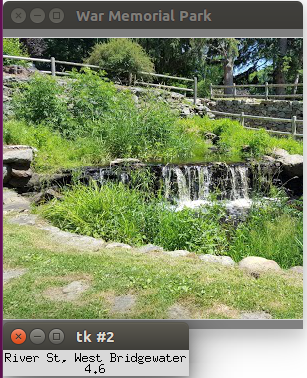
It also reveals the rating for the area (based on user reviews), for Plymouth County the rating is: 3.9/5 stars, the website for the park, (if applicable) and the specific address for the park.
The same information can be found by clicking a different pixel in the satellite image and searching in a new area.
The search radius can be adjusted, as well as the attraction searched for, in the code below, which is the Google Places code that searches the latitude and longitude in google to find specific information.
query_result = google_places.nearby_search(
    location = latlong, keyword='Park',
    radius = 10000, types=[types.TYPE_PARK])