Pages: | Home | Geographic and Satellite Information | Google Maps | Outcomes and Application | Our Story |
Process and Implementation
How the Program Works:
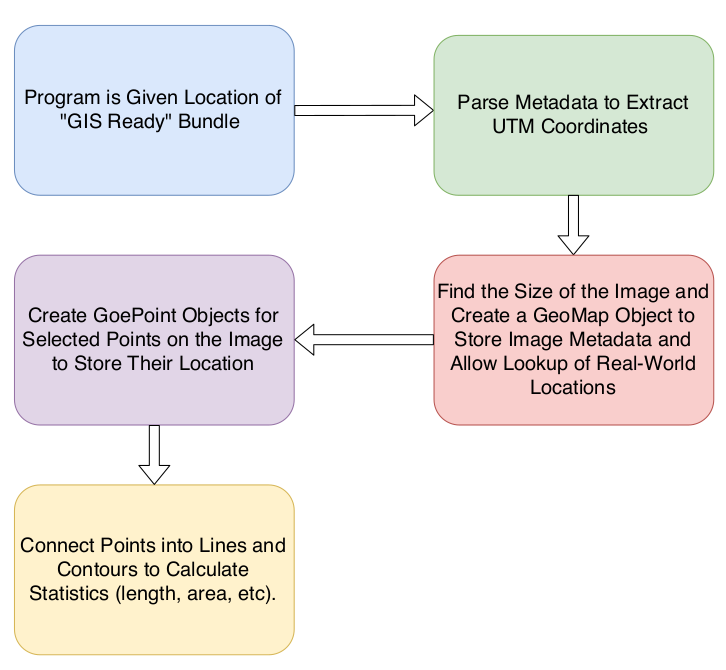
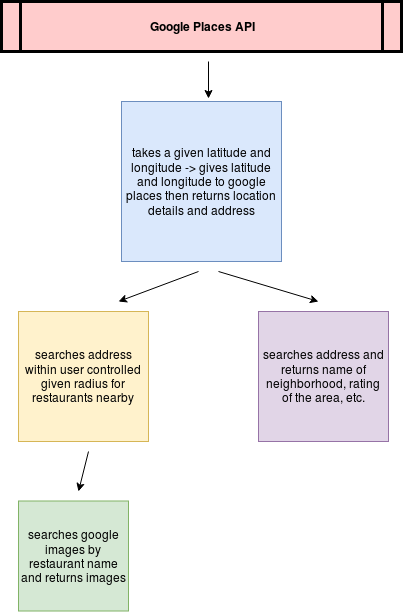
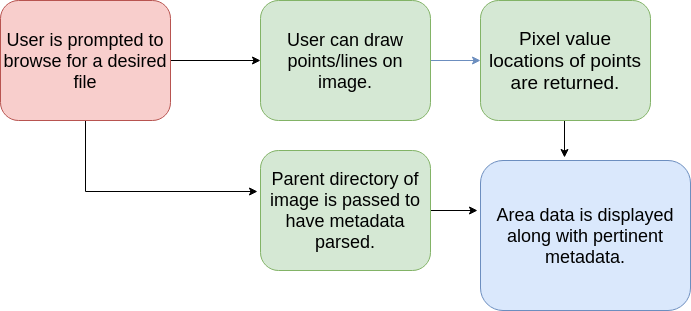
- The general flow of the program can be broken into three modules. The Image Processing, the Google Maps API, and the GUI. The flow of information goes from the Image Processing to the Maps API and ends in the GUI. Below we have broken down each of those three modules to give you a better sense of what happens in each.
Image Processing
Maps API
GUI
Implementation: To run this program you will need to install numpy, googleplace, PIL, geopy.geocoders, cv2, utm, shapely. You can use the following commands to do so.
pip install numpy
pip install python-google-places
pip install Pillow
pip install geopy
pip install opencv-python
pip install utm
pip install shapely
After installing all necessary software clone the repositoy (https://github.com/rickyroze/SoftDesFinalProject.git) and run Final.py.
git clone https://github.com/rickyroze/SoftDesFinalProject.git
python3 Final.py
A file selector will pop up and you will be asked to select an image to run the program with, you can either use an image we have provided from USGS (also in this repository:https://github.com/aidenclpt/Final_Project_Image_Repo) or import your own satellite images. If you choose to use an image from us, you will want to run the line of code below in your terminal window.
git clone https://github.com/aidenclpt/Final_Project_Image_Repo.git
After the GUI will pop up allowing you full access to the program!
Attributions:
United States Geological Survey (USGS), Google Places API Documentation, Orbview3